 BPN-TRACK
Sound & read-out: hear your alerts
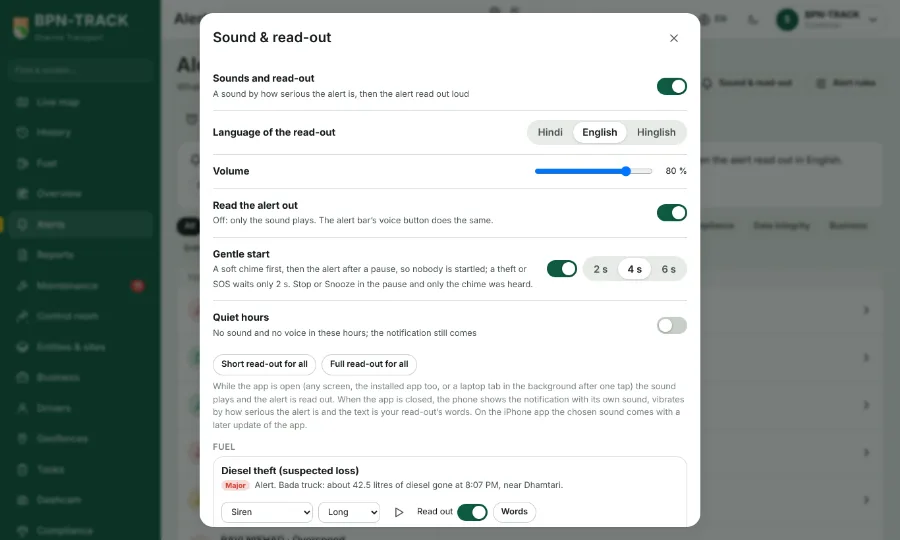
A ringtone by how serious the alert is, then the alert read out in your language, in your own words.
How to
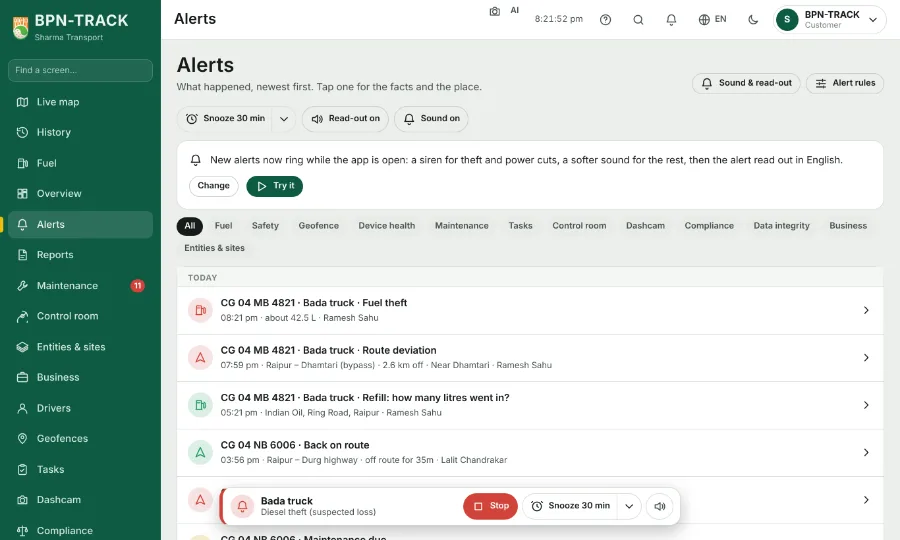
- Open Alerts and tap Sound & read-out at the top (also under Settings > Alerts).
- At the top: the master switch, the language (Hindi, English, Hinglish), the volume and quiet hours when nothing rings.
- Each alert has its own row: pick its sound (soft chime, tring-tring, alarm, siren, horn, bell ...), short or long, press play to hear it, and switch the read-out on or off.
- "Words" opens the read-out's text: tap the tokens ({vehicle}, {time}, {litres}, {place} ...) to insert them, or choose the Full or Short preset; Test plays it with sample values.
- The sound and the voice play while the app is open on any screen. When the app is closed, the phone shows the notification with your own words and vibrates by how serious it is.
- While an alert sounds, a small bar at the bottom offers Stop, Snooze (from 30 minutes up to tomorrow) and the read-out on or off. The same three switches sit at the top of the Alerts page.
- An alert starts gently: a soft chime, a few seconds' pause with the bar counting down, then the sound. Stop during the pause and only the chime was heard.
- A short BPN-TRACK tune plays while the app opens. Under Sound & read-out, Startup sound, choose Every time, Once a day or Off; an alert always stops the tune at once. A dealer or an organisation can set its own tune under Logo and brand colours where allowed.