 BPN-TRACK
History filters: only the stops, speeds and events that matter
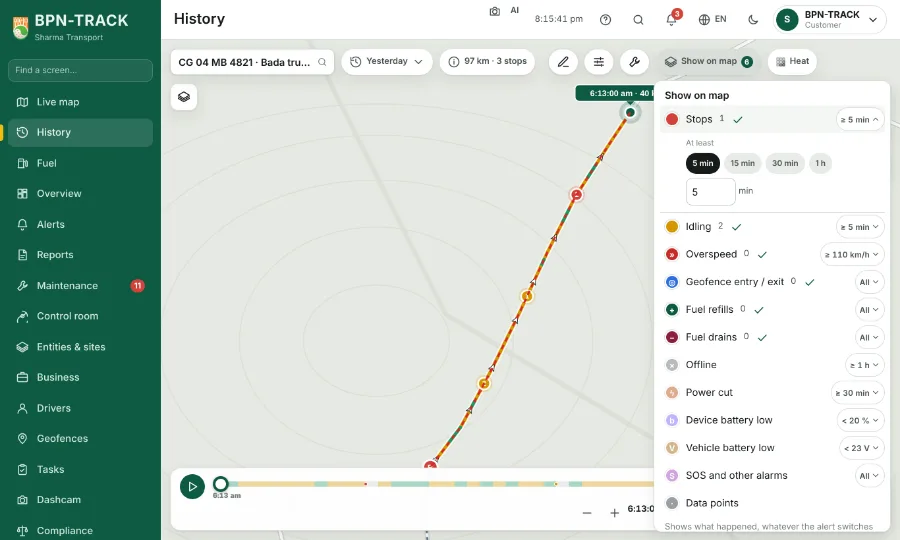
Give each Show on map layer its own limit; the app keeps your choice for that vehicle.
How to
- On History, open Show on map and tap the filter at the right of a layer's row (for example ≥ 5 min). Pick a ready choice such as 15 min, or type your own figure.
- Stops and Idling: the shortest stop to show, for example at least 5 min (the starting choice).
- Overspeed: the speed from which a stretch counts, 110 km/h to start with. Offline and Power cut: how long they lasted, 1 hour and 30 min to start with.
- Fuel refills and Fuel drains: at least so many litres, or All. Geofence entry / exit: tick the geofences you care about. SOS and other alarms: tick the kinds.
- Device battery low: below a percentage (20 % to start with) for at least a time. Vehicle battery low: below a voltage, 11.5 V on a 12 V vehicle and 23 V on a 24 V one to start with.
- The pins on the map, the marks on the replay bar and the counts change at once. Your filters are kept for each vehicle with your login, on every device.