 BPN-TRACK
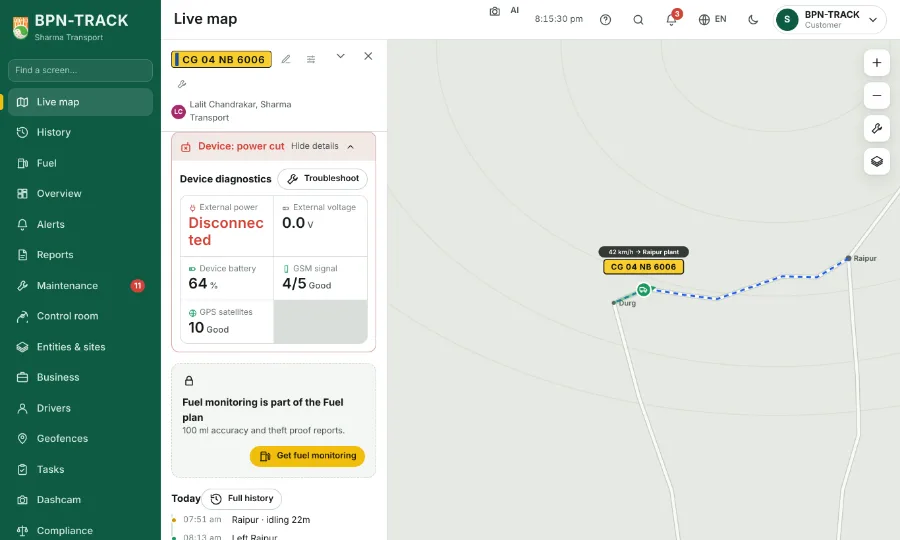
The Device line: red, orange or green
One verdict on the device fitted in the vehicle, with the reason in plain words.
How to
- Open a vehicle on the Live map. The Device line sits in its panel; the list row's dot and the card's small device icon show the same colour.
- Green, "Device fine": nothing to do.
- Red: the device is not reporting, the main power is cut, the fuel sensor is not connected or shows an error, or there has been no GPS fix for a while. The words say which, for example "Device: power cut".
- Orange: something to watch, such as only 3 satellites, a weak mobile signal, a late last message, the device's own battery low or a low vehicle voltage.
- Low voltage is judged for each vehicle: only when its Low voltage alert is on in Configure, the figure suits the vehicle's own 12 V or 24 V system, and the reading is below the level this vehicle normally shows with the engine off.
- Tap the line to unfold Device diagnostics: each reading as a tile, with a Fuel sensor tile that says Connected, No reading just now, Not connected or the error.