 BPN-TRACK
Kilometres and the Odometer tile
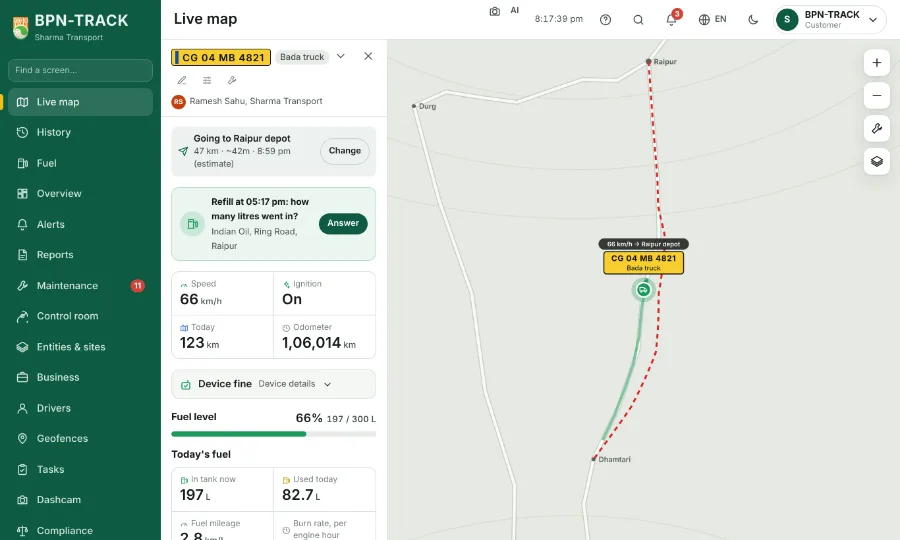
Today's km, History, Fuel and the Odometer tile all count the same kilometres, so the figures agree.
How to
- The vehicle panel shows today's kilometres and the Odometer tile. History's day and trips and the Fuel screen's distance use the same count.
- The Odometer tile counts from the day the vehicle joined BPN-TRACK (as far back as its record goes) and only goes up: a device that restarts or loses its own count does not make it jump or fall.
- When a vehicle's odometer leaps in a day by more than it could have driven, that day counts the kilometres of its actual route instead -- on the card, in History and in every report. A device whose clock has gone wrong is flagged in Troubleshoot.
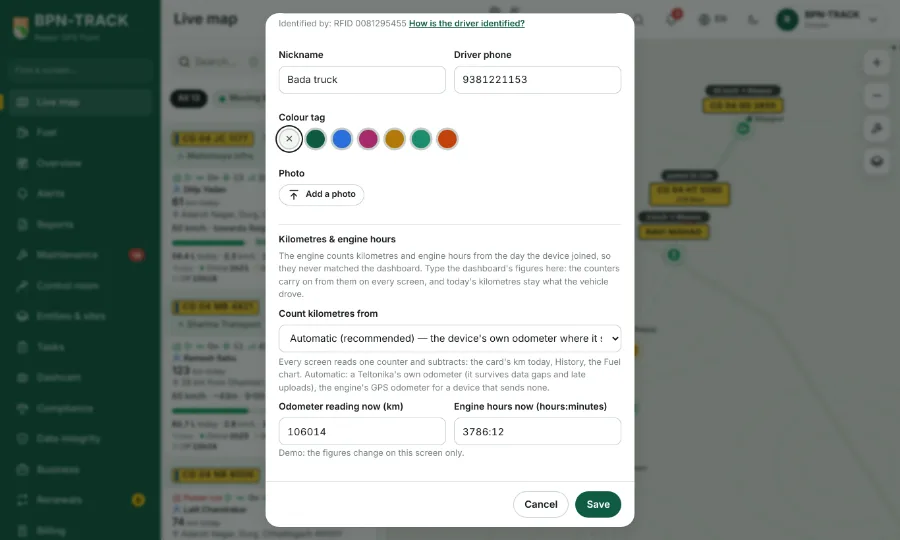
- To make the tile read the same as the vehicle's dashboard, open the vehicle, tap the pencil (Edit vehicle details) and go to Kilometres & engine hours.
- Type the dashboard figure in Odometer reading now (km) and save. The tile shows that figure and grows from it; today's kilometres stay what the vehicle drove.
- Setting the odometer is for your dealer, or for you if your login has "Set odometer and engine hours".
- Troubleshoot shows since when the kilometres are counted ("Odometer counted from").